Showing posts with label Software. Show all posts

Thursday, May 01, 2008

Psystar Open Computer isn't just a haox but it's real!

Until yesterday, the Mac pc clone that is Psystar Open Computer still in doubt but today i have the blog coverage about this clone pc.And it is a video review from famous gadget blogs.

From blog zdnet,they have open box of Psystar Open Computer to see what is inside this pc package.


While engadget has test this Mac clone to know how it's perfomance compare than the other real Mac pc and laptop.

Thursday, November 08, 2007

Call Of Duty 4 trailer in XBox 360 and PS3(video)

XBox 360 is from Microsoft while PS3 from Sony,of course this two game device has its advantage and disadvantage depends on the user wether they prefer XBox or PS3.

Maybe the feature user choose is how great this device when come in term of graphic.The best device that have best graphic will make the player more feel like inside the game itself.

Maybe this video trailer of Call of Duty 4 will show use what device has grater ability in graphic processing;

Monday, November 05, 2007

Learn how to combine differents RSS feeds into one.

By using Yahoo! pipes,we can combine multiple feeds from differents blog or website into one and syndicate it again.This is a simple video tutorial on how we can use this great tool made by labnol.

Saturday, September 29, 2007

Thumbalizr.Com - thumb your blog or web image.

With thumbalizr you can take screenshots of any webpage you want.Use it for your presentations, documentations, visualizations or your web page.

thumbalizr.comJust enter the target-URL and press the "thumb it"-button. Wait a moment and a screenshot of the desired page will be taken. You can choose between a screenshot with a fixed height of the screen or the complete webpage.
That's it! Just click one of the resolution-links (320, 640, 800, 1024 or 1280 pixel width) to download your screenshot.

Monday, July 30, 2007

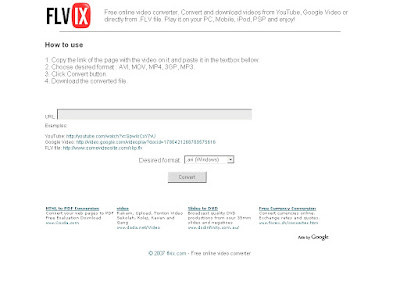
Flvix.Com - Online video converter.

Ok, have you tried vixy.net in my last post. Have comments and want to share other website that offer the same function as vixy do?Feel free to do it and i trult appreciate.

Flvix.com is the other service as vixy.net, offer the same function as vixy.net. I thinks, it's clone of vixt.net(in it's concept). It's good for us right?Having a various of choice.

How to use it as flvix recommend:
  1. Copy the link of the page with the video on it and paste it in the textbox bellow.
  2. Choose desired format : AVI(windows), MOV(mac), MP4(mobile), 3GP(iPod,PSP), MP3(audio).
  3. Click Convert button.
  4. Download the converted file.

Friday, July 27, 2007

Vixy.Net - Online Youtube .flv video format converter.

Nowadays, everything is online. From send an electronic mail to your friend till control your desktop from the other place through remote desktop application, these you can do it online. There are a lot of applications enable you to do this that help us to make our life more easier.

We are always watch online video at youtube. You watch an interesting video, the cool one or make you heart beat fast than usual. And something come to your mind, how can i download and play that video but your pc or laptop doesn't have any
software to do it. You really want to keep it! But how?


So, here is your solution. Why not convert that video online to playable format and download it to your hard disk. Vixy.net can do those thing for you! It's quite easy. Copy your youtube url than open vixy.net. Paste your url at the blank box then press start. Before that, make sure you have set what type of video format you want. Currently, vixy.net allow you to convert online video from *.flv format to avi, mov, mp4 or 3gp and also, audio format *.mp3. Very simple huh?


About this service:

This service allows you convert a Flash Video / FLV file (YouTube's videos,etc) to MPEG4 (AVI/MOV/MP4/MP3/3GP) file online. It is using a compressed domain transcoder technology (outline in Japanese). It converts FLV to MPEG4 faster and less lossy than a typical transcoder.

When you submit an url, it will download and convert to the video format. Then you can download the converted file.

FLV to MPEG4 Conveter engine is now OpenSource. You can download the source code via subversion: http://sourceforge.net/svn/?group_id=183657

For Windows users: Please install DivX to play DivX AVI.

Saturday, April 14, 2007

Websitescreenshots.Com - snap your website picture...

In my last post,i wrote about a website named Snat.Ch where offer users an option to capture their website or blog screenshots online !You can go here to read more about that website.

Now,there is another option we can use to capture our web page.Websitescreenshots.Com offer users an option to take the screeshots of their web page using a software provide by them.

The difference between Snat.Ch and Websitescreenshots.Com is Snat.Ch only take the screenshots that appear on your browser.That means,you maybe get half picture of your web page.While using Websitescreenshots.Com,you can get the whole picture of your web page.


About

WebShot is a program that allows you to take screenshots and thumbnails of web pages or whole websites. It comes with a command line interface for advanced users. The following image formats are supported JPG, GIF, PNG, BMP.

For downloading this software and to get more information about it,feel free to go here.

p/s:Maybe there is some bug while you using it.

Launchy.Net - forget your start button and try this new way...

Since we know windows os from the starting,we always use start button to start our desired program or to close our pc.Are you bored or feel sick to do it again and again for the rest of your life?

Scroll your mouse to start button,click it.Then scroll to your desired program and click it again as usual.Ahhh,it's boring guys.

Try this new way!Why not to use keystrokes to open certain program since we use it the whole of our life for typing.Keystroke has it's own potential guys.

How to use keystroke to open your program?
Just download a software named launchy!


Launchy is a free windows utility designed to help you forget about your start menu, the icons on your desktop, and even your file manager.

Launchy indexes the programs in your start menu and can launch your documents, project files, folders, and bookmarks with just a few keystrokes!

screenshot

You can download the software at launchy official website or at this link.Launchy also have skins to be downloaded.

For mac user,please go here to know about asimilar software.

Wednesday, February 28, 2007

Freedownloadscenter.Com

click above picture to go to the website

Yup,another the download website for you.Just for you from me.Freedownloadscenter.Com is not just a free software download website but it also offer a preview of all software that have been uploaded.

Everyday,webmaster of this website will write a review of certain software at the website blog and you can check for it.So again,feels free to check that website by clicking above picture.
Freewarefiles.Com

click above picture to go the website

Yet,another freewarefiles download website.It's same like softpedia.com but yet another website.Feel free to go to this website and you will se a lot of software that are offered by the webmaster of this website.

Next post,another freewarefiles download website to you.So,please check my blog often.

Monday, February 26, 2007

Softpedia.com

click above picture to go to the website

Softpedia is a site that indexes information and provides downloads for many games, drivers, mobile phones, and software for the Windows, Macintosh and Linux platforms. The site also indexes major technology, science, health, and entertainment news both from ticker servers and from in-house sources. As of late December 2006, it is one of the top 500 websites on the internet according to Alexa traffic rankings.The site was originally known as Softnews.ro. It was changed to Softpedia towards the end of 2003.


Softpedia claims to thoroughly test each software product and game they list and to check each one for evidence of viruses, malware, adware or spyware using a variety of well know antivirus and antispyware products. Programs which Softpedia finds to be free of viruses, malware, adware and spyware are given its "100% Clean" award; programs which are also free are given Softpedia's "100% Free" award. There are many controversies about reliabilty of these certificates, though (see Discussion for details).

Software categories are arranged hierarchically and are modeled after Windows filesystem paths, such as "C: \ Mobile Phone Tools \ Sony Ericsson." Large category listings are split across multiple pages. Users can sort by criteria such as the date of the last update, the number of downloads, or the rating.

For me,softpedia is a huge store of software which can found in it and what you need is just explore it yourself.Maybe,you will find something interesting you or something you are searching for.

Sunday, February 25, 2007

Giveawayoftheday.com

click above picture to go to the website

As you can see at my sidebar blog,there is a big picture that show the Giveaway Of The Day.Want to know how i get this software?Just follow the article.

Giveawayoftheday.com is the website that offer free software everyday to the user.Everyday,there will be the new software that are to shared with the user.But for a limited time only,you only have 24hour to grabe it.Is it enough for you?Yeah,i think it is really enough for us right?

Giveaway of the day - what's that?
Well, that's a convenient initiative allowing you to get the best commercial software titles - for free. Every day we offer licensed software you'd have to buy otherwise, for free! Yes, we are giving away software, and you can download it from our site, right now and right here and our goal is to give away every good piece of software, sooner or later. Want to learn more about our project?


For further information,feels free to go to Giveawayoftheday.com or just click the Giveawayoftheday.com banner on the right sidebar.So,enjoy the free giveawayoftheday..